Royal School Locker Design Studio
Reviews
Royal School Locker Design Studio offers a refreshingly low-stress creative experience. The drag-and-drop mechanics are responsive, and the variety of colors and motifs provides enough choice to keep the activity interesting without overwhelming younger players. The absence of timers or scores allows for genuine experimentation. It works equally well on desktop and mobile, making it a convenient option for quiet play. While it is not a complex game, it serves its purpose as a safe, constructive pastime that encourages organizational thinking.
Description
Creative Customization Options
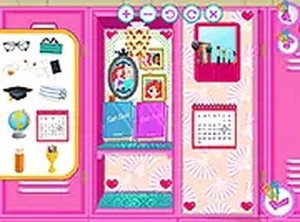
Players begin by selecting a character to assist, then choose from a palette of colors and decorative themes for the locker interior. The system offers multiple motifs, from floral patterns to geometric shapes, allowing each locker to reflect the character's personality. This phase encourages thoughtful decision-making as users consider how different elements work together visually.
Drag-and-Drop Organization
The core interaction involves picking up items such as textbooks, writing tools, personal photographs, and decorative accessories, then placing them inside the locker space. Controls are intuitive, requiring only a click and drag motion that works smoothly on both touchscreens and mouse-driven devices. Items can be repositioned freely, giving players complete control over the final arrangement.
Relaxed Pacing for All Ages
There are no timers or scoring systems, so players can work at their own speed. This design makes the game accessible to younger children who may need extra time to explore options, as well as older players who want to refine their layouts. The absence of pressure supports a calm, focused creative process.
Cross-Platform Accessibility
The game runs directly in web browsers on mobile phones, tablets, and desktop computers without requiring any downloads or account creation. Full-screen mode is available for those who prefer an expanded view, which can help with precise placement of small items. This flexibility means the activity can be enjoyed at home, during travel, or in educational settings.
Compatibility
Faq
Is Royal School Locker Design Studio free to play?
Do I need to create an account or download software?
What age group is this game designed for?
Can I play on a smartphone or tablet?
Are there different characters to choose from?
Does the game save my progress if I close the browser?
You May Also Like

Urban Order Puzzle Adventure
Royal School Locker Design Studio

Fruit Fantasy Fashion Studio
Fantasy Character Creator Studio

Open Road Motorcycle Speedrun

Seafoam Mermaid Dress-Up Creator
String Marionette Football Trials

Auto Art Studio: Design & Fix

Vehicle Pair Recall for Toddlers

Comments
0 comments